
win7访问documents and settings文件夹的详细步骤
win7如何访问documents and settings文件夹呢?熟悉win7系统的用户都知道,win7默认系统盘中的documents and settings文件夹是受系统保护禁止访问的,要想访问这个文件夹,就需要更改一些安全设置。因此,今天小编就教大家win7访问documents and settings文件夹的详细步骤。
1、右击documents and settings文件夹,在属性页面切换到”安全“分页中。

属性
2、在”所有者“分页中,所有者默认是”SYSTEM“,将所有者改为自己。
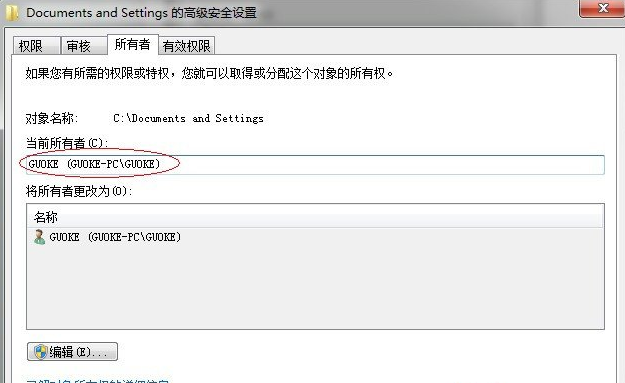
高级安全设置
3、之后就可以修改权限了。因为”拒绝“的优先级高于”允许“,所以必须删掉那项,不然,还是无法访问的。
相关文章
- Win7系统怎么访问Documents and Settings文件夹?
- win7系统开机显示rebootandselect怎么办?
- Win7安装软件时提示Command line option syntax error
- Win7系统下android sdk manager 无法更新怎么办?
- Win7旗舰版开机显示rebootandselect要怎么处理?
- win7系统中documents and settings目录无法访问
- Win7开机显示reboot and select proper boot device怎么办?
- 怎么解决Win7打开Local Settings文件夹提示“位置不可用,拒绝访问”?